You have a sales team. They're good. Really good.
But they are also buried in spreadsheets. Swamped in data input. Wasting mornings searching for email addresses rather than making deals.
That's not selling. That's called just surviving.
Here is what the most intelligent sales leaders discovered: remote assistants do not take the place of your closers. They free them.
Let me show you exactly how.
The One Sentence Answer (For People in a Hurry)
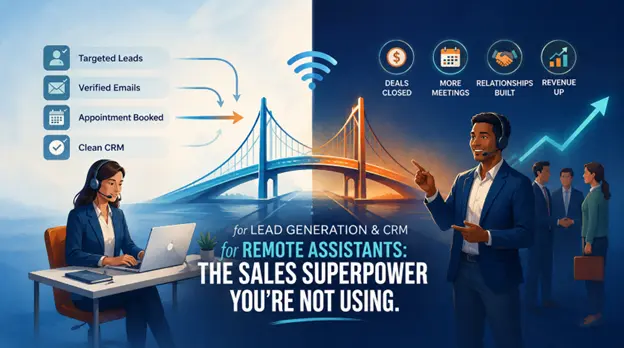
Remote assistants take over the repetitive, time-wasting processes of lead generation and CRM, prospecting, data entry, follow-ups, and appointment setting, leaving your sales team to do what they do best, which is to sell.
And now we will proceed to see how this works.
Lead Generation Without the Grind
Prospecting is detested by most salesmen. Not that they are lazy. Because it's administrative, and they are made to work with relationships and not rabbit holes. And here the services provided by a virtual assistant come in handy.
They Find the Right People (So You Don't Have To)
Your VA logs into tools like LinkedIn Sales Navigator, Apollo, or Hunter.io. You give them your Ideal Customer Profile: industry, company size, job title, and location. They build a targeted list of 500 prospects while you sleep.
Your virtual assistant will log into the tools such as LinkedIn Sales Navigator, Apollo, or Hunter.io. You just need to give them your Ideal Customer Profile along with industry, company size, job position, and location. They will create a targeted list of around 500 prospects while you sleep without any worries.
No more guessing. No more cold emailing to the wrong person.
They Reach Out (Politely, At Scale)
This is where individuals become apprehensive. Will they be robot-like?
So, the answer is absolutely No. No. An excellent VA customises, and they also send connection requests that actually get accepted.
They also draft functional emails that sound quite impressive to drive attention and to make more deals. If your industry or organisation loves phone calls, most of the virtual assistants can make 100-200 calls per day.
You don't have to worry, as that is not spam. This is actually physics, where more interactions mean more meetings and more outcomes.
They Qualify Before Passing the Baton.
Are you having the worst feeling in sales? A hot lead that goes cold because you called them too early.
Your VA uses a simple checklist: budget, authority, need, timeline.
When the prospect fails to check the boxes, the VA feeds them automated content. If they do? The VA makes a discovery call right to your calendar.
You show up. You close. That’s the entire game.
CRM Management That Doesn't Make You Cry
Here, let me ask you something.
When was the last time you actually trusted your CRM?
It's okay if you hesitated a little bit here, as it's just you’re normal. Most of the CRM are full of duplicates, missing notes, outdated stages, and leads also fall into a black hole. A virtual assistant ensures to reverse with a functional and successful approach.
They Clean Up the Mess.
Every day, your VA does data hygiene. They remove duplicate contacts and also fix formatting errors, update lead sources. They also record the conversations that you had three days ago.
Fix formatting errors. Update lead sources. Log call notes from that conversation you had three days ago.
Now you need not make your CRM a graveyard. With a virtual assistant, let's make it a source of trust and success.
They Keep the Pipeline Visible.
So, what your sales manager would actually like to know is: where are all the deals?
Your VA makes sure to update lead stages in real time.
Your VA updates lead stages in real time. "Contacted." "Demo scheduled." "Proposal sent." "Closed won." They label leads according to the source, LinkedIn, referral, cold call, and therefore, you understand what really works.
No longer any Friday afternoon panic of ‘’what did we even do this week?’’
They Make Sure No One Falls through the Cracks
Holding the cracks is ultimately the silent killer of your sales. A lead expresses interest, but you get busy. When you remember three days later, it's already too late.
Your VA sets up automated follow-up sequences. Drip emails. Alerts to call back within 10 days. Tasks that are waiting to be done.
Prospects feel remembered. You resemble a hero.
They Tell You What's Working (With Actual Numbers)
Once a week, your VA sends a simple report:
- How many new leads entered the pipeline
- How many emails were opened
- How many meetings got booked
- How long are leads taking to convert
You need to stop guessing and begin optimising.
Why This Actually Works (The Strategic Stuff)
I recently have three reasons why smart businesses are already doing this.
- Cost: A remote assistant is less expensive by 30-78 per cent compared to an in-house employee. Also, you don't need to spend on office spaces, payroll tax, and more. Don't think it is skimming, well, it is actually math.
- Scale: Working on prospecting in the next month? Just add another VA. Slowing down your performance? Just scale back with Virtual Assistance. No need for any awkward layoffs or HR headaches.
- Speed: Your assistant works when you are asleep. Differences in time zones imply that the responses are received at 2 AM. It is the difference between we will call you tomorrow and here is my calendar link.
Frequently Asked Questions (How-To & Implementation)
What are the best tools for a lead generation VA?
The tools of 2026 will focus on a ‘’Lead Gen Stack’’ that uses high-precision data harvesting and AI-based personalisation. The majority of VAs have Apollo.io or ZoomInfo to prospect, Clay to enrich data, and HubSpot or Pipedrive to manage CRM. Email deliverability is guarded by such tools as Hunter.io or NeverBounce.
-
Apollo.io / ZoomInfo – massive intent-based contact libraries
-
Clay – "waterfall" check data on a variety of sources.
-
HubSpot / Pipedrive – intuitive visual pipelines with AI follow-ups
-
Zapier / n8n – seamless lead flow from social platforms to CRM
Closure: Provide your VA with these tools, and you will have your pipeline filled as you sleep.
How do I distinguish between an MQL and an SQL for my VA?
An MQL (Marketing Qualified Lead) has indicated informational interest, such as downloading a whitepaper, but is still in the research phase.
A SQL (Sales Qualified Lead) will display a definite buying interest, e.g., requesting a demo or inquiring about pricing. Your VA is a gatekeeper with a Lead Scorecard that has BANT criteria (Budget, Authority, Need, Timeline).
-
MQL: engaged with content, still researching
-
SQL: asks for demo, pricing, or competitor comparison
-
VA's job: filter out "window shoppers," hand off only hot leads
Closure: Train your VA on this one distinction, and your sales team will not lose a minute more on tire-kickers.
Step-by-step workflow for outsourcing CRM data entry
Begin by providing your VA with a limited access code and a field dictionary so that the data does not degrade.
Apply the Loom-to-SOP procedure: have the VA write the SOP using the video of you processing five leads.
The daily execution is done by a Search-Verify-Enter cycle, or searching duplicates, verifying contacts with Apollo/Hunter, and entering data.
-
Step 1: Restricted CRM access + field dictionary
-
Step 2: Record Loom, VA writes SOP
-
Step 3: Daily "Search-Verify-Enter" cycle
-
Step 4: Weekly 5% spot-check audit + monthly Cleanliness Report
Closure: This turns data entry from a headache into a self-correcting system.
How to track the ROI of a virtual assistant for sales?
You can track ROI by calculating net gain time arbitrage plus direct pipeline contribution. Calculate your "Value of Reclaimed Time" (hours saved x your hourly rate), and include revenue in deals the VA brought in or developed. Make sure to track Pipeline Vlocity (how much faster leads move through CRM stages). After that, see your Customer Acquisition Cost (CAC) fall.
-
Value of Reclaimed Time = hours saved × your hourly billing rate
-
Plus revenue from VA-sourced or VA-nurtured deals
-
Plus, reduced CAC from offloading non-revenue tasks
Closure: A great sales VA doesn't cost money; it makes money. You'll see it in the math.
How to give a virtual assistant access to HubSpot without admin rights?
HubSpot Permission Sets in the "Users and Teams" section. The Set object access is owned only for everything, but not for delete and export to off. Grant access to Sales tools ( Templates, Meetings ) but not to Account Access and App Marketplace.
Save as a "Lead Gen VA" Permission Set.
-
Delete and Export = OFF (no loss or theft of data)
-
Sales tools = ON (Templates, Meetings)
-
Account Access & App Marketplace = OFF.
-
Make Two-Factor Authentication (2FA) a requirement.
Close: This can be set only once, and then you can sleep knowing that your data is yours.
Data Security Risks When Outsourcing CRM Management
Data theft, credential weaknesses, and compliance breaches ( GDPR, DPDPA ) are the most important threats.
A malicious assistant can steal your database, or some accidental leakage can be provided with the assistance of the so-called Shadow IT (unapproved personal apps). Avoid Least- Privilege access model, disabled export rights, and Multi-Factor Authentication (MFA).
-
Risk 1: Rogue assistant intends to export data.
-
Risk 2: Unintentional breach through personal applications.
-
Fix: Least-Privilege access + export disabled + MFA.
-
Plus: frequent audit log reviews
Closure: With these guardrails, you get all the benefits of remote support without the nightmares.
How to monitor a remote assistant's outreach activity?
Ensure that you come up with a strict policy that ‘if it is not in the CRM, it did not occur’. Make sure you measure CRM dashboards to track live Touches/Day and Meeting/Opportunity ratios. Weekly Spot Check of messages sent through the use of a shared inbox or BCC. Swap tracking of mouse moves with two-minute daily video summaries of ‘Proof of Work’.
-
Policy: Keep a record of all emails, messages, and calls in CRM.
-
Measures: Touches/day, Meeting/Opportunity ratio.
-
Quality: Weekly spot checks and BCC monitoring.
-
Output: 2-min daily video summaries (wins & blockers)
Closure: Monitor results, not mouse clicks. Your VA will be grateful, and so will your pipeline.
Cost of a Lead Generation Specialist vs a General Virtual Assistant
A Lead Generation Specialist is almost 20-50% greater than a General.
The Lead Generation Specialist is 20-50 per cent more expensive than a General VA since they have learned the art of sales psychology and complex automation stacks (Apollo, Clay, CRM workflows). The project offshore professionals ought to receive between 8-17/hour compared to the general administration of 4-10/hour. Experts require little training and are likely to have their own outreach plans.
-
General VA: $4-10/hour -admin efficiency
-
Revenue-driven results Lead Gen Specialist: $8-17/hour.
-
Proficiency benefit: brings personal equipment + plans, reduced training.
Closure: Pay the specialist when you are bandwidth starved, but not by pipeline growth.
Should I pay a lead gen assistant a commission or a flat rate?
The optimal is a combination: base rate + performance bonuses. Flat rate is no incentive; commission-only will bring spammy outreach and turnover. A hybrid provides security to the assistant and compensates for high-quality Sales Qualified Leads (SQLs). Common arrangement: recurring monthly retainer and tiers based on a booked meeting.
-
Flat rate: predictable and low motivation.
-
Commission only: High turnover, spammy, risky.
-
Hybrid: base retainer and bonuses based on SQL meeting.
-
Bonus rewards assistants on the basis of quality rather than volume.
Closure: Get their incentives in line with your results, and see your pipeline become fat without the burnout.
Lead Generation Agency vs. Individual Remote Assistant: Which is Better?
Choose an agency when you might need an already prepared and well-technological sales platform with AI intention data and tested systems that are most suitable for fast growth and do not require heavy supervision.
Choose one assistant in case you have a proven playbook and just need a particular executor to perform manual prospecting and CRM updates. Agencies are more expensive but provide quicker time-to-value.
-
Agency: technical skills, ready-to-use systems, quicker initiation.
-
Personal: more flexible, tactical, less expensive, under personal control.
-
Agency = shorter time-to-value (reduced onboarding).
-
Individual = preferred with founders who already have playbooks.
Closure: Need a strategy? Hire an agency. Need execution? Hire a person. Your call.
How to test a VA's ability to find contact information?
A live and practical test should be conducted based on the capacity of a virtual assistant to locate the contact information. Make sure to offer them a target company and request three decision makers. Ensure to confirm their confirmed direct emails with a brief personalised hook with all the latest updates in the company. As an example of such news, funding, and product releases.
The appropriate virtual assistant will ensure that they give you the right and formatted data, and also assist you in explaining how they do so. They also talk about the tools they work with, such as Apollo, Hunter.io, etc. After all, they aim to ensure the relevance of their data.
The poor assistant mainly tends to use only generic emails. For instance, they mostly use email as information, contacts that are already used or outdated, and also not personalised. Nevertheless, virtual assistants will have an opportunity to demonstrate their research skills, attention to detail, and want to apply their skills in practice in the real world. This method is more successful than a resume or an interview.
What are the abilities a CRM manager must possess on their resume?
A good CRM manager resume must be indicative of the combination of technical, analytical, and business skills. Technically, they ought to be familiar with such platforms as Salesforce and HubSpot, as well as the workflow automation tools, such as n8n and Zapier. The experience in the sphere of data management, segmentation, and customisation of CRM is the most significant.
They should also possess knowledge of analytics and be in a place to track such parameters as the conversion rates, churn, and customer life cycle performance. A big bonus is more and more AI skills, such as predictive lead scoring and automation.
On the soft skills front, desire cross-functional collaboration, communication with the sales and marketing departments, and the ability to enable adoption within an organisation.
Above all, a good CRM manager is not just someone who manages data; he or she creates systems that increase revenue, improve business processes, and assist in decision-making with clean and actionable data.
What are the top AI solutions that can automate lead research by VAs?
Many AI tools can be used to automate the lead research process. This includes platforms such as Clay, Apollo.io, and ZoomInfo. Such platforms will dominate in 2026 and later on. Clay can perform exceptional multi-source data and enrichment, and is automating 2026 and the next few years. Nonetheless, Apollo.io promises to deliver a complete database containing AI-linked research procedures.
In the case of ZoomInfo, it will offer in-depth but enterprise-wide contact information and intent signatures. AI tools such as Clearbit and Seamless.AI. This is also useful in real-time enrichment and verified contact discovery. Finally lessens the manual workload of the virtual assistants.
How to integrate n8n automation into a VA's daily workflow?
The implementation of n8n into the workflow of a VA begins with the identification of repetitive operations such as lead scraping, data entry, CRM updates, follow-ups, and basic research. n8n allows automating all these processes into interconnected workflows that can transfer data between tools such as LinkedIn, Google Sheets, CRMs, and email platforms without human exertion.
Here is an example of a workflow that will automatically take the leads in a source, enrich them with company and contact data, and automatically route them to a sheet or CRM.
Another flow may also be applied to create short company snippets or customised email drafts, which the VA just has to check and approve.
This puts it on the VA to execute manually, but not as the frontline, but as a control to check the quality of data, refine the output, and handle exceptions. The outcome is that there is quicker lead processing, reduced error rate, and the amount of productivity is greatly enhanced without adding to the workload.
The Bottom Line (Save This Part)
On its part, not every team that fails to sell is due to that team being untalented; rather, a large portion of their time is consumed in mindless, deadwork.
Remote assistants change that equation. They do not substitute your salespeople; they multiply them. They eliminate the noise by managing prospecting, CRM maintenance, follow-ups, and data management, allowing your team to concentrate on what really matters– building relationships, solving problems, and closing deals.
A good VA is more than just the help of the tools and systems in place. They are an amplifier to your whole sales machine.
The actual question is not whether your team is able to sell or not. Whether they can find enough time to do so.